

Engineering
Top Software Tools for Product Engineers in 2026
Product engineering teams in 2026 are under intense pressure to ship features faster while maintaining high code quality. Yet, unclear, outdated, or scattered documentation often slows them down. This article explores the top software tools that help engineers move quickly without sacrificing clarity or quality.

Table of Contents
- Version Control Systems
- 1. GitHub
- 2. GitLab
- 3. Bitbucket
- 4. Azure Repos
- Code Editors
- 5. Visual Studio Code
- 6. Windsurf
- 7. Sublime
- 8. Cursor
- Project Management Solutions
- 9. Jira
- 10. Asana
- 11. ClickUp
- 12. Linear
- CI/CD Tools
- 13. Harness
- 14. CircleCI
- 15. Jenkins
- 16. Azure DevOps
- 17. Bamboo Data Center
- Technical Documentation Platforms
- 18. Fluid Topics
- 19. Doxygen
- 20. MkDocs
- 21. Docusaurus
- 22. Stoplight
- Selecting Your Software Documentation Tool Stack
Product engineering teams are facing higher pressure than ever in 2026. They’re expected to ship features faster and improve code quality within increasingly short release cycles. The big question many teams are asking is which software tools actually help product engineers move faster without sacrificing quality or clarity?
However, it’s not that simple. When specs, APIs, and release notes aren’t updated or centralized, confusion spreads both internally and externally.
Teams tend to prioritize timely releases over updated documentation. However, when documentation falls behind or isn’t centralized, it creates user confusion. As a result, engineering teams waste time responding to repeated questions or fixing avoidable issues instead of building new features.
To keep up with release cycles and deliver documentation in sync with product updates, engineers need the right tools. A strong tool stack includes version control systems, code editors, CI/CD tools, project management solutions, and technical documentation platforms. In this guide, we break down the top software tools for product engineers from trustworthy favorites to new innovative solutions. We gathered the top software tools for product engineers to help teams ship faster, document smarter, and scale with confidence.
Version Control Systems
Version control systems, or VCS, are core developer tools. They track project changes, store versions in repositories, compare updates to past versions, and collaborate seamlessly on codebases.
1. GitHub
GitHub is a cloud-based platform where software teams build, review, and ship code together, built around Git for version control. For product engineers, it serves as both the system of record for the codebase and the collaboration layer around it: pull requests for proposing and reviewing changes, issues and projects for tracking work, and Actions for automating tests, builds, and deployments. It also standardizes communication through Markdown, used in READMEs, issues, pull requests, and documentation, making technical context, decisions, and instructions easy to write, review, and keep close to the code.
Key features:
- Collaborative Coding: This solution emphasizes collaborative development. GitHub offers dedicated community discussion spaces, built-in version control to track code changes, and a notification system to track peer contributions.
- GitHub Copilot: GitHub Copilot is an AI editor that helps developers create tests and documentation. Teams choose their preferred AI model, ask Copilot questions, and get relevant answers. It also generates code based on each developer’s coding style, mixed with custom instructions.
- GitHub Advanced Security: This solution scans documentation repositories for leaked credentials and sensitive data, catching security issues before they become incidents. For regulated industries, the audit trail of every documentation change provides the compliance evidence you need.
2. GitLab
GitLab is an open-source DevSecOps platform built around Git. It allows developers to build DevOps software with native AI. The platform supports teams from code commit to production in one central solution. This is ideal for those who want all DevOps tools (i.e., planning, version control, CI/CD, security, etc.) in a centralized place.
Key features:
- Source code management: Its Git-based repository promotes seamless teamwork between developers. It combines collaboration, acceleration, and compliance and security to implement a version control system.
- Code review workflows: GitLab helps developers automate, track, and report code reviews. It also offers code review analytics for continuous workflow improvement.
- AI code suggestions: GitLab’s new enterprise-grade AI capabilities include helping developers write secure code quickly. The solution can generate new code based on a natural language component. It also uses AI to complete one or a few lines of code.
3. Bitbucket
Bitbucket is a Git-based source code hosting platform from Atlassian that’s designed to fit tightly into team workflows, especially for organizations already using Jira and Confluence. This all-in-one solution includes everything teams need to ideate, code, and go to production. It has also integrated native AI features throughout the development lifecycle.
Key features:
- Bitbucket pipelines: This is a YAML-configured, integrated CI/CD service built into the Bitbucket cloud. Pipelines empower teams with full branching to increase deployment visibility. They help developers build, test, and deploy code based on a configuration file in their repository.
- Reusable building blocks: The solution offers pre-built “pipes” to automate building workflows. These building blocks include tasks like deploying to AWS, sending Slack notifications, or running security checks.
- Atlassian intelligence: Atlassian is partnering with OpenAI to bring AI capabilities to its suite of tools. This includes code suggestions, code translations, and more. They have also launched a beta version of their Model Context Protocol (MCP) server.
4. Azure Repos
Azure Repos is a set of version control tools within Microsoft Azure DevOps (ideal for teams already in the Microsoft ecosystem). It provides Git repositories or Team Foundation Version Control (TFVC) for source code management.
Key features:
- Web hooks and API integration: The platform offers a comprehensive REST API that allows teams to create subscriptions, manage webhooks, and integrate with external services. By adding validations and extensions, teams automate workflows across development tools.
- Semantic code search: Azure helps teams quickly find what they’re looking for with its integrated code-aware search engine. This semantic search for code understands classes and variables.
- Built-in CI/CD: Teams can trigger builds, tests, and deployments using continuous integration/continuous delivery (CI/CD). In Azure, this is automatic with every completed pull request using Azure Pipelines or other tools.
Code Editors
Code editors are software applications that allow engineers to write and edit source code. These can be open-source code editors or proprietary, standalone code editors.
5. Visual Studio Code
Visual Studio Code, also called VS Code, is a popular open-source AI code editor developed by Microsoft. It includes embedded version control with Git. VS Code is known for features like code editing, debugging, file management, an integrated terminal, extensibility and customization, and source control.
Key features:
- Agent mode: Teams can create unique workflows combining VS Code extensions and MCP servers. This allows AI agents to read a team’s codebase, suggest edits, run terminal commands, and respond to compile or test failures.
- Next edit suggestions: This platform analyzes code to suggest the next most-probable string of code. It makes edits in real-time and, if accepted, adds changes directly into the editor.
- Code anywhere: Teams can connect to VS Code via the Cloud, a remote repository, or in their browsers. The built-in source control provides out-of-the-box Git support.
6. Windsurf
Windsurf is an AI-enabled integrated development environment (IDE). It was the first IDE to include an agent to support code automation. The advanced security and proprietary Fast Context and SWE-1.5 models support teams with large codebases.
Key features:
- Cascade: This is Windsurf’s integrated AI chatbot. It combines deep codebase understanding with advanced tools and real-time suggestions. The result is relevant suggestions on production codebases to optimize code and debug issues.
- Windsurf Tab: This feature helps teams ship features in production faster. With autocomplete, teams can generate code by predicting the intention behind the code. Teams can then add and update imports with a quick tab keypress.
- Windsurf previews: Previews let teams see their websites live in the IDE. Once in the preview, they can simply click on an element to see how Cascade can reshape it for their needs.
7. Sublime
Sublime Text is a text and code editor from Sublime. It is known for its streamlined user interface and extensive feature stack. Some capabilities include syntax highlighting, code folding, native support for various programming and markup languages, an integrated terminal, and customizable themes.
Key features:
- Context-aware autocomplete: Sublime’s new autocomplete engine provides suggestions based on a project’s existing code. Additionally, these smart completions include information justifying the type of suggestion with links to definitions.
- Syntax highlighting: This engine includes features like multi-line constructs, the ability to handle non-deterministic grammar, lazy embeds, and syntax inheritance.
- Sublime Merge: This is a Git graphical user interface and merging tool under the Sublime product line. Combined with Sublime Text, teams can track changes in a commit across 40 languages.
8. Cursor
Cursor is an IDE built on VS Code. It uses native AI tools and agents to increase productivity by accelerating coding tasks for developers. Cursor has an open approach to AI models, allowing users to choose between OpenAI, Anthropic, Gemini, and xAI.
Graphite, an AI-powered code review platform, signed a definitive agreement to join Cursor in December 2025. This merger brings together two best-in-class code editing tools
Key features:
- Coding agent: Cursor offers a coding assistant that developers can delegate coding tasks to so they can focus on higher-level missions. This platform includes a codebase embedding model that gives the Agent deep understanding and recall.
- Codebase indexing: This feature lets Cursor see how modified code connects to the rest of a project. It can track whether a change duplicates logic, doesn’t respect existing patterns, or misses edge cases that similar code handles.
- Bugbot: Bugbot automatically reviews pull requests. It reads the full context of new changes, including how updated code interacts with the entire codebase. It also looks for potential bugs. Unlike linters that catch formatting issues and simple patterns, Bugbot looks for logic errors.
Project Management Solutions
Today’s engineering projects are complex, requiring file sharing, project mapping, timeline management, and budget management. Product management tools help teams oversee workflows from start to finish.
9. Jira
Jira is an Atlassian product, alongside Confluence and Bitbucket. This well-known project management tool uses tickets to help teams plan and track workflows. Users can break milestones down into actionable steps, organize missions, and map dependencies. The interface is adjustable, so users can display work as lists, boards, sprints and backlogs, timelines, or workflows.
Key features:
- Project planning: Engineering managers can seamlessly align peers, resources, and deliverables based on company goals. Customizable maps and milestones make it easy to build clear project plans and meet deadlines.
- Collaboration hub: This central collaboration workspace offers notifications, integrations with popular applications, comments, smart links, and attachments. Its cloud-based platform supports cross-team work and shared release calendars for smooth launches.
- Reporting: Built-in insights give teams clear visibility into project progress. These analytics help managers make better decisions and quickly adjust plans when needed.
10. Asana
Asana is a leading work management solution to track company-wide goals on a single platform. It offers collaboration tools for complex projects. This software helps teams of any size or locational distribution work together to achieve business objectives.
Key features:
- Asana AI: This AI assistant automates busy work to let teams focus on more valuable tasks. AI Teammates are agents that can complete complex workflows to achieve defined goals.
- Reporting dashboards: Asana’s dashboards allow teams to visually follow their progress. The real-time charts provide key insights into the state of each team’s work: where they’re behind, what’s working, and what’s stuck.
- Multiple project views: Asana offers five different project views, each with custom labels. This allows project owners to spot blockages, create progress reports, and ensure workflows are running smoothly.
11. ClickUp
ClickUp is a productivity platform. It brings teams and tools together to collaborate and achieve goals in one central location. It has extensive work management features, including its own AI tool.
Key features:
- Customizable tasks: The platform offers over 35 different apps that allow teams to customize their task management. From adding sprint points to creating custom field data and setting up automations, teams can work any way they want.
- Document and share: The document feature lets users share ideas, document bug history, record meeting minutes, and more. The docs are updated in real-time and include rich editing features.
- AI Super Agents: ClickUp’s new agentic teammates use infinite knowledge and memory to maximize team productivity. Users can @mention, assign tasks, and direct message these agents. They respond and execute tasks, just like human colleagues.
12. Linear
Linear is a modern project management tool for product and engineering teams. It offers a streamlined interface to track issues, plan sprints, and manage roadmaps. Many fast-moving engineering teams choose Linear for its focus on velocity and minimal friction.
Key features:
- Seamless developer integrations: Linear integrates tightly with GitHub and GitLab, automatically updating issue statuses when developers open pull requests. It also integrates with Slack, Figma, and Sentry, allowing product engineers to track issues without leaving their development environment.
- Cycles and triage: Cycles function as time-boxed sprints (about 1-2 weeks). During a sprint, teams can automatically track completion rates and carryover issues. The Triage feature is like a team inbox. They can route incoming bug reports and feature requests to the appropriate person.
- Keyboard navigation: Engineers can seamlessly navigate and update issues without touching their mouse. The platform lets teams create tasks in seconds and customize work views. This focus on velocity means less time managing tasks and more time building the product.
CI/CD Tools
Product engineers must continuously deliver new features. This involves writing code, combining it with existing code, and deploying it quickly. Teams need a good CI/CD pipeline to make the transition from local development to production smooth.
We already mentioned GitHub and GitLab in the version control section. Therefore, we won’t mention them here, but they are popular CI/CD tools.
How to Simplify Documentation Publishing for Software Product Releases
13. Harness
Harness is a unified, end-to-end platform for AI-enabled software delivery. It aims to help software teams deliver code reliably, efficiently, and quickly. To do this, it uses AI tools to orchestrate a complex series of coordinated releases.
Key features:
- GitOps: Tame Argo Sprawl with Harness’s centralized management that works with Open Source. Most GitOps tools only declare the end state. Harness orchestrates the entire process to eliminate sprawl, automate promotions, and secure governance at scale.
- Lightning-fast builds: Harness CI uses AI, smart testing and caching, and hyper-optimized infrastructure to accelerate software builds. It boasts that teams can accelerate test cycles by 80% with its AI-based test intelligence.
- Security testing: This solution seamlessly integrates security scanners and orchestrates tests across build pipelines. It helps developers fix vulnerabilities using intelligent deduplication and prioritization, AI-generated code fixes, and prescriptive remediation guidance.
14. CircleCI
CircleCI is a leading CI/CD platform for developers to build, test, and deploy code. It connects directly to Git repositories to automatically run pipelines on code changes, enforce tests, and deploy applications across environments. It offers both a Cloud-based solution (CircleCI Cloud) and an on-premise platform (CircleCI Server).
Key features:
- MCP server: CircleCI offers an MCP server. It allows AI agents to build logs and test outputs, access pipeline statuses, track configuration changes, and monitor workflow performance metrics.
- Docker support: This platform includes native Docker support. This enables teams to build and test code in containerized environments with x86 and Arm.
- Build optimization: Teams can split jobs across containers to execute pipelines faster. The platform’s intelligent caching and optimized infrastructure help push code to production faster, too.
15. Jenkins
Jenkins is a self-contained, open-source automation server. Developers use Jenkins as a CI server to automate tasks around building, testing, and deploying software. Teams looking for self-hosted CI/CD tools often choose Jenkins.
Key features:
- Extensive plugins: This solution offers hundreds of plugins to integrate with most CI/CD tools. This ensures teams have the tools they need for each workflow within the software development life cycle.
- Pipelines-as-code: This solution supports build-pipelines-as-code. That allows teams to configure builds, deployments, and tests with source code stored in a source repository. Teams use this to check code in version control, improving the build process’s sustainability and versioning.
- Easy, customizable configuration: Jenkins is simple to configure thanks to its Web interface. It offers user-friendly ways to set up and manage jobs. Teams can modify the interface through its plugin architecture.
16. Azure DevOps
Microsoft Azure DevOps (previously called Visual Studio Team Services—VSTS) is a set of developer tools and services. It allows DevOps teams to manage their production environments. This solution provides visibility across enterprise projects with multi-stage deployments.
Key features:
- Azure pipelines: The Pipelines automate building, testing, and deploying code. They seamlessly integrate with both GitHub and Azure deployments. Additionally, they allow teams to launch simultaneous multi-channel deployments.
- Azure artifacts: This DevOps service lets teams create, host, and share code efficiently using software packages (i.e., NuGet, npm, Maven, and Python packages) controlled from a unified platform.
- GitHub Copilot: The Copilot manages mundane tasks in any IDE to optimize productivity and decrease the time to value. This AI-developer tool combines the power of GitHub and Azure to enable end-to-end development and deployment.
17. Bamboo Data Center
Bamboo Data Center is a continuous delivery pipeline that promises resilience, reliability, and scalability from code to deployment. As an Atlassian product, Bamboo has deep integrations with solutions like Jira and Bitbucket.
Key features:
- Continuous delivery: Teams gain full control and smooth releases by combining Docker and AWS CodeDeploy to deliver final products. Bamboo enables agile development throughout workflows.
- Scalability and flexibility: Bamboo offers build agents to scale workloads and run multiple builds. This solution also supports popular source code management systems like Git, Mercurial, and SVN. Finally, it supports branch management.
- Configuration-as-code: Bamboo allows teams to define build plans and deployment projects as code. This is possible using YAML files or Bamboo Specs. This helps teams apply version controls for their CI/CD configurations alongside application code.
Technical Documentation Platforms
Software documentation is essential for product releases and subsequent user adoption. Good documentation must stay up-to-date and be easy to find to deepen product knowledge. Modern documentation platforms don’t just store information; they automate updates, integrate seamlessly into developer workflows, deploy alongside code, and leverage AI to keep content accurate and discoverable.
18. Fluid Topics
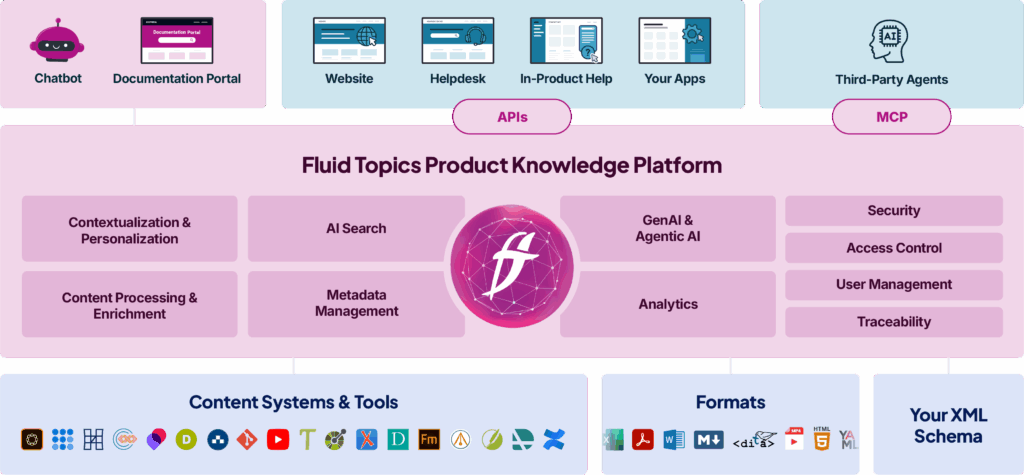
Fluid Topics is a dedicated Product Knowledge Platform that consolidates and unifies scattered content into a single, authoritative source. From there, it delivers product knowledge to any channel—documentation portals, in-product help, support tools, or AI interfaces. Since product documentation is a strategic, enterprise-wide asset, Fluid Topics offers an MCP server. This lets LLMs and AI agents access and interact with product content in a controlled, standardized, and dependable way.
Key features:
- Out-of-the-box connectors: Ready-made connectors centralize and unify content from various locations in one knowledge hub. This allows users to access all software documentation from any endpoint connected to Fluid Topics. For example, the Markdown connector allows teams to quickly and easily publish and package content from Visual Studio Code for users.
- AI Assistants: Fluid Topics transforms how users find, read, and navigate content. The platform does this by placing AI interactions at the core of digital experiences. In just a few clicks, teams can enrich content with capabilities like real-time translation, interactive chatbots, code generation, and more.
- Automatic release note generation: Fluid Topics integrates directly into CI / CD pipelines, ensuring documentation is always in sync with software updates. Each commit or merge triggers Fluid Topics’ bot to pull relevant tasks and format them into a release note aligned with the current product build. Developers no longer need to compile notes manually after each release cycle.
Embed Release Notes into your CI/CD Workflow with Jira
Companies can streamline agile document production using tools like Fluid Topics, which employs bots and custom fields in Jira’s Release Management System. This setup allows teams to link tasks to a Product Version Number. The bot extracts tasks related to the product update, organizes them into a Release Note template, and publishes it for proofreading, enabling quick updates to the public documentation portal.
19. Doxygen
Doxygen is a source code documentation tool that automates content generation. It supports various programming languages: C++, Java, Python, PHP, C#, Objective-C, Fortran, VHDL, Splice, IDL, and Lex. When developers create software documentation for users, Doxygen ensures information remains consistent between code and documentation.
Key features:
- Multiple export format: Developers can choose from different formats when exporting their documentation (e.g. HTML, PDF (via LaTeX), Word (via RTF), and XML). Doxygen is flexible, suiting their needs and allowing them to integrate documentation into various systems.
- Markdown support: Doxygen provides Markdown support to upgrade the form with powerful features. This includes elements like the commands \param, \return, \brief, and more. Adding this information helps developers enhance their code documentation with a deeper context.
- C++ support: The platform offers extensive support for documenting C++ code. It has deep knowledge of this language’s intricacies, so they aren’t lost when teams generate documentation.
20. MkDocs
MkDocs is an open-source static site generator that transforms Markdown files into a clean, searchable documentation website.
Key features:
- Markdown-based authoring: Teams prepare documentation in plain Markdown, a simple and widely used format. All Markdown files are stored within a dedicated documentation directory. Developers can write docs in plain Markdown, which is simple and widely understood. All Markdown files then go into a documentation directory.
- Static HTML site: Teams can quickly generate fully static HTML websites. Site management is handled through a single YAML configuration file that controls navigation, themes, plugins, site details, and build settings.
- Documentation preview: MkDocs includes a built-in development server that allows teams to preview documentation while writing. As changes are saved, the preview automatically reloads in the browser.
21. Docusaurus
Docusaurus is an open-source static site generator developed by Meta (formerly Facebook). It is designed to help teams quickly build and maintain documentation websites. The platform uses React components for customization and supports content creation with Markdown and MDX.
Key features:
- Content versioning: This enables teams to keep documentation aligned with different product and software releases.
- Document translations: The platform provides built-in localization and translation support, allowing teams to prepare documentation for global audiences. Users can integrate their preferred translation tools, such as Git or Crowdin.
- Algolia search: Docusaurus includes built-in support for its integrated Algolia search tool, making it easy for users to quickly find relevant documentation.
22. Stoplight
The Stoplight Platform offers a user-friendly interface tailored for modern API design workflows. Its patented technology includes best-practice guidelines and a component library that supports searching, reusing, and governing APIs throughout their lifecycle.
Key features:
- API design tools: Stoplight provides a visual editor that allows developers to design, prototype, and share JSON Schemas and OpenAPI specifications. Teams can also automate documentation generation using editable Markdown.
- Collaboration features: Whether managing a single API or hundreds, teams can collaborate seamlessly with internal, external, or mixed developer groups. Features such as tracked changes, shareable APIs, and dependency management streamline collaboration.
- Centralized assets: All API design assets are available in a centralized repository, making it easy for teams to discover and reuse OpenAPI specifications across internal systems while supporting both internal and external API development.
Selecting Your Software Documentation Tool Stack
Product engineering teams need the best tools on the market. A good tool stack helps accelerate product releases and get key product documentation to the users who need it. By building a tech stack from these 22 tools, engineers will be well-equipped to meet goals while focusing on high-value tasks.
Schedule a free demo of Fluid Topics with a product expert
Software Tools FAQ
An IDE stands for Integrated Development Environment. It’s a software application that provides comprehensive tools for writing, testing, and debugging code all in one place. Think of it as a “workshop” for programmers where everything they need is available in a single setup.

 How to Simplify Documentation Publishing for Software Product Releases