

Content Ops
The Best Software Documentation Tools in 2026
Explore the top software documentation tools and upgrade your tech stack for seamless workflows across teams.

Table of Contents
- What Is Technical Documentation for Software?
- What Is a Software Documentation Tool?
- How to Choose the Right Software Documentation Tool
- What Are the 20 Best Software Documentation Tools?
- What Are the Best Content Authoring and Management Tools?
- What are the Best Developer Documentation Tools?
- What Is the Best Product Knowledge Platform?
- Conclusion: Choosing the Right Software Documentation Tools
Editor’s Note: This post was originally published in February 2025. It has been completely edited and updated for accuracy and comprehensiveness.
Key insights
- Modern documentation tools should support structured authoring, content reuse, collaboration, and multi-channel publishing.
- AI-powered search, automation, and analytics help users find information faster while improving documentation quality.
- Finding solutions that integrate with existing content ecosystems streamlines documentation workflows.
- Choosing scalable, AI-ready tools prepares documentation teams for evolving customer expectations and enterprise AI initiatives.
Microsoft Word simply won’t cut it as your sole tool for creating software documentation. Technical writers, developers, engineers, subject matter experts (SMEs), and other teams need different documentation tools throughout the content operations lifecycle. Product documentation is highly complex. It often contains code, diagrams, and collaborative inputs.
With so many options available, finding the best fit for your tech stack can be challenging. However, the right tools make a huge difference in team productivity, documentation release cycles, and successful user adoption. Let’s explore the top software documentation tools of 2025 and their key features to help you decide.
What Is Technical Documentation for Software?
Technical documentation is a collection of materials that explain the use, functionality, or architecture of a product, system, or service. It’s not limited to text content; it also refers to code, images, and videos.
In software engineering, this documentation includes all content related to each step of the software development lifecycle (SDLC). That comprises everything from API documentation to sprint backlogs, user guides, system documentation, release notes, and more.
6 Technical Documentation Trends to Watch in 2026
What Is a Software Documentation Tool?
A software documentation tool is a tool used to create, manage, and publish documentation that explains how software is built, works, and is used. It helps keep information clear, structured, and up to date throughout the software lifecycle. These tools typically support different audiences, including developers, end users, and internal teams, and are designed to make documentation easy to write, search, maintain, and scale. Common capabilities include:
- Creating and editing content (often with Markdown or visual editors)
- Organizing documentation with sections, links, and versioning
- Automatically generating documentation from source code or APIs
- Integrating with development tools like Git and CI/CD pipelines
- Publishing documentation as websites, PDFs, or in-app help
Overall, software documentation tools reduce confusion, improve collaboration, and ensure reliable knowledge sharing as software evolves.
How to Choose the Right Software Documentation Tool
The first step in choosing your software documentation tools is to identify your team’s needs. Do you need a tool for simply creating documentation? Are you looking to share documentation notes with other teams, showcase key product information, or offer user support?
Consider your organization’s current tool stack. What’s already in place, and what essential features might be missing? Key aspects to evaluate include:
- Ready-to-go integrations and APIs to connect with other tools in your ecosystem;
- Vendor plans for MCP servers to choose tools that will be equipped for your future agentic workflows;
- Flexible authoring options;
- Collaborative workspaces where SMEs, technical writers, engineers, and other teams can work together;
- Scalability to support future growth and evolving documentation needs;
- Security features such as access controls, encryption, and compliance with industry standards.
Also consider your budget and how different stakeholders plan to collaborate. Finally, read customer testimonials and test free trials or demos to inform your decision.
What Are the 20 Best Software Documentation Tools?
To help you optimize your software documentation creation and management, we have compiled a list of the 20 best tools to choose from. Mix and match the solutions from the list depending on your documentation needs. Creating a custom roster of top-tier tools will maximize outputs.
What Are the Best Content Authoring and Management Tools?
Let’s start with tools for your technical writers. They need flexible solutions, including CCMSs, headless CMSs, and other tools to produce comprehensive documentation.
oXygen XML Editor
oXygen XML Editor provides a comprehensive suite of XML authoring and development tools. It offers easy content creation, editing, and publishing for novice and advanced users alike. It is widely used by technical writers, developers, and data professionals working with XML-based technologies. Interoperable with other platforms, oXygen XML Editor easily factors into a larger toolset or works as a standalone app. It was designed with collaboration in mind, allowing users to monitor, compare, and merge changes with tracking tools.
Key features:
- Single-Source Publishing: oXygen XML Editor simplifies workflows! Documentation teams can create diverse media formats with a single file or set of files. It offers both preset and configurable options for output types (e.g., PDF, ePUB, HTML, etc.).
- XML Publishing Frameworks: Get publishing and editing support for the most common XML documentation frameworks, such as DITA, XHTML, DocBook, and TEI. Users can also create their own frameworks.
- Connectivity: This solution offers strong connectivity support that allows the XML Editor to seamlessly interact with most XML databases, Content Management Systems (CMS), and WebDAV resources.
Paligo
Paligo is a popular Component Content Management System (CCMS) that provides topic-based authoring and single-sourcing documentation reuse. This Docbook-based solution remains popular for creating technical documentation, training content, policies and procedures, and other knowledge management content.
Key features:
- Single Sourcing: Multiple team members can work simultaneously on different components in a single document. Seamless, real-time collaboration reduces confusion and helps keep content up to date for easy reuse.
- Content Reuse: This core CCMS feature allows users to create a library of quality content components available in multiple formats for reuse in future documentation. As a result, authors don’t need to start over for each piece of content. Streamline your content production, save time, cut spending, and enhance content consistency with content reuse.
- Structured Authoring: Technical writers focus on producing content without considering layout or formatting. Structured writing uses predetermined components to create a structured document. This increases documentation reuse, improves consistency, and reduces costs.
Madcap IXIA CCMS
Madcap IXIA CCMS (previously IXIASOFT CCMS) is a popular component content management solution. It specializes in open XML content creation and management. This enterprise-grade CCMS is based on the DITA standard.
Key features:
- Innate Professional Writing Features: This CCMS comes with oXygen XML Editor and oXygen Positron AI Assistant built in. Teams get real-time access to smart recommendations on improving their grammar, tone, and content quality directly in the editing application. This solution is particularly great for helping new writers become autonomous quickly, thanks to its Word-style author mode.
- Version Management: Track all comments, revisions, and versions with full audit trail capabilities. Madcap IXIA CCMS offers a comprehensive set of tools. This includes controlling version permissions and recording the state of entire documents at a precise moment in time.
- Collaborative Review: Its World-like interface simplifies the complexity of DITA. It offers search capabilities and context maps for collaborative reviews. This solution enhances collaboration between teams by facilitating content sharing.
Tridion Docs from RWS
Tridion Docs is RWS’s enterprise-grade DITA-based CCMS. It helps the world’s largest companies improve how they create, manage, localize, and distribute content. A composable platform, Tridion Docs is formed by a series of modules that meet each user’s needs.
Key features:
- Generative AI Capabilities: RWS offers a GenAI-powered linguistic tool that boosts productivity while keeping authors in full control.
- Advanced Content Production Tools: This user-friendly, browser-based editor includes granular change-tracking for effective information governance. It also offers an intuitive comment display near the insertion point, with threaded discussions for enhanced collaboration.
- Project Management Support: Oversee the advancement of your documentation with Tridion’s content status tracker. Also, manage multiple projects at once thanks to the platform’s unified interface across projects, creating a seamless workflow.
RWS’ collection of tools now also includes Fonto, a user-friendly web-based XML editor for intuitive structured content authoring.
Author-it
Author-it is a powerful and fully integrated CCMS. It is designed to streamline the creation, management, localization, and publishing of diverse information products. At its heart, Author-it is built on the principle of single sourcing. This enables organizations to efficiently reuse and repurpose content across multiple outputs.
Author-it is a popular choice for technical writers, content developers, and non-technical contributors to develop user assistance, product manuals, customer help systems, and knowledge bases.
Key features:
- Augmented Authoring: Author-it offers real-time content authoring suggestions based on previously reviewed documentation. Authors save time while seamlessly reusing content.
- Multi-Format Publishing: Teams only need to create content once. They can then publish it in various formats and document types without needing to adjust or reformat the content for each endpoint manually.
- Clear Approval Workflows: Content teams and subject matter experts can simultaneously interact with, review, comment on, and suggest text changes to content in real-time. Content managers can then accept or reject suggestions.
How to Actually Get Your Content Delivery Right

Componize
Componize helps global enterprises optimize their content strategies and operational workflows, including authoring and publishing. Componize’s Alfresco-based CCMS combines the power of Componize’s CCMS with Alfresco, an open-source enterprise content management platform.
This tool offers flexible content format support as well as open architecture and APIs for a smooth content management experience.
Key features:
- Metadata Management: Authors have access to tools like automatic injection and extraction of metadata into XML content, collaborative tagging, content search and filter, and more. By offering smart metadata processes, teams ensure their content is traceable and manageable.
- Link Management: Componize offers features to organize, manage, and keep track of DITA XML links. Componize’s features guarantee safe, robust links thanks to its intuitive management interface.
- Translation Management: Teams can track their documentation translation status, prepare the source content that needs translation, and streamline the translation workflow. This is possible with dynamic tracking, partial translations, and automatic updates. The feature Smart Merge allows content professionals to add typo corrections to a translated content folder and integrate the fix into the new content, even if external translation is in progress.
Intuillion (DITAToo)
Intuillion is the company behind DITAToo DITA CCMS, a content automation platform to help documentation teams produce, manage, and publish product content. Its tools facilitate content automation and deliver personalized product content.
Key features:
- Streamlined Translation: DITAToo reduces unnecessary translation costs by automating translation processes while maintaining visibility throughout the process.
- Interoperable Infrastructure: Teams have a wide array of connectors to facilitate easy integrations for a unified solutions infrastructure. The connectors include Content Delivery Platforms, wikis, translation management systems, publishing platforms, and more.
- Modulable Structure: Companies can get started quickly, beginning with a simple implementation while budgets are reviewed, then expanding functionality later, thanks to DITAToo’s modularity. Core modules include their web editor, virtual content repository, and external connectors.
Bluestream Content Solutions
Bluestream Database Software Inc is a world leader in XML. Its CCMS, XDocs DITA, is a popular solution for businesses looking to optimize their information workflows. This single-sourcing solution is standards-compliant. Bluestream supports companies in developing, managing, storing, and delivering large quantities of XML and non-XML content.
Key features:
- Quality Authoring Tools: With XDocs DITA CCMS, organizations quickly and efficiently scale content creation, support collaborative authoring, and promote content versioning. These tools reduce documentation costs while enhancing content accuracy and usability.
- Content Management: Teams gain access to tools for metadata management, smart content reuse, agile release management, and precise content reporting. Additionally, this solution offers detailed compliance reporting in regulated industries.
- Localization Management: Bluestream Content Solutions empowers users to optimize translations and localization, quickly react to shifts in requirements or strategies, and send content in one language to localization while simultaneously working on the source language content. These tools reduce localization costs and shorten the time-to-market.
Heretto
Heretto is another content operations platform used across industries. Their DITA-powered CCMS helps teams develop and personalize documentation for excellent experiences across endpoints.
Key features:
- Structured Content Lifecycle Management: With an intuitive interface, documentation teams oversee their whole content ecosystem. This cloud-based platform empowers users to collaborate at scale. With componentized content creation, history logs, version control, and content reuse, content teams can easily manage documentation.
- Content Governance: Help your content meet industry regulations and internal documentation standards with complete compliance and regulation adherence. From data security backed by a commitment to SOC Type II compliance to version control management, this CCMS prioritizes security.
- Translation Management: Teams have access to a translation memory that stores approved translation segments for future reuse. The platform also allows teams to adapt content to cultural and regional compliance requirements for a smooth localization process.
Adobe Experience Manager (AEM) Guides
AEM Guides is Adobe Experience Manager’s component for creating, managing, and publishing structured content based on DITA and XML. This CCMS helps teams easily collaborate, review text, reuse content, and achieve consistency across knowledge base articles, user guides, manuals, and more.
Key features:
- Structured Content Management AEM Guides supports the DITA (Darwin Information Typing Architecture) standard, enabling modular, reusable content authoring. This approach helps maintain consistency across documentation while minimizing duplication. By structuring information as small, self-contained topics, teams can efficiently reuse content across multiple publications and delivery channels.
- Single-Source Publishing: One of the biggest advantages of AEM Guides is single-source publishing. You can write your content once and publish it across different platforms like mobile, web, and PDF without needing to reformat it for each channel.
- AI-Powered Automation Adobe Sensei, the AI engine behind Adobe products, plays a crucial role in AEM Guides. It automates content tagging, metadata creation, and other time-consuming processes, making it easier for content creators to focus on writing rather than administrative tasks.
Discover How KONE Delivers Smart Information with AEM Guides and Fluid Topics
ClickHelp
ClickHelp is an online documentation tool that lets teams publish content in a single portal. It allows companies to both author and host content, optimizing workflows with native AI tools.
Key features:
- Single-Sourcing and Content Reuse: Teams can eliminate repetitive work and content duplication by reusing content across multiple outputs.
- Collaboration Environment: Cloud hosting, unlimited version history, custom notifications, and advanced filtering are just a few of the features that make ClickHelp teamwork-friendly.
- AI Suite: This solution’s AI-powered tools include AnswerGenius (an embedded chatbot for context-aware answers from docs), WriteAssist (an in-editor AI assistant for content creation), and Ask Your Docs (a beta-tested solution for searching across published and draft content).
What are the Best Developer Documentation Tools?
Now let’s look at the solutions that help developers write, collaborate, and share their code. Tools need to support popular programming languages and remote collaboration.
MkDocs
MkDocs is an open-source static site generator that takes Markdown files and converts them into a clean, searchable documentation website.
Key features:
- Markdown-based Authoring: Users can write docs in plain Markdown, which is simple and widely understood. All Markdown files then go into a documentation directory.
- Static HTML Site: Teams can quickly build fully static HTML sites. They can manage the site with a single YAML configuration file, which controls the site name, navigation, theme, plugins, and build settings.
- Documentation Preview: MkDocs offers a built-in dev server that lets teams preview their documentation as they are writing. As authors make edits and save changes, the preview will auto-reload and refresh the browser.
Popular Integrations with Fluid Topics to Enhance Your Content Workflow
Jira
Jira is one of Atlassian’s core products, alongside Confluence and Bitbucket. This highly popular project management tool helps teams across organizations plan and track work. Users can break major milestones down into actionable steps, organize missions, and map dependencies. The platform also includes adjustable interfaces, letting users visualize work as lists, boards, sprints, backlogs, timelines, and workflows.
Key features:
- Project Planning: Team leads and project managers can seamlessly align peers, resources, and deliverables based on company goals. With easy-to-design maps and milestone planning, it is simple to outline efficient plans for how projects can meet deadlines.
- Collaboration Hub: Jira centralizes team collaboration. It does this with its notification settings, connections to popular third-party applications, commenting system, smart links, and attachments. This Cloud-based platform also facilitates cross-team connections by providing shared release calendar templates for smooth launches.
- Reporting: Optimize present and future team workflows with dedicated project insights. These analytics improve managerial decision-making, providing project leads with full visibility to determine if everything is on track or if changes need implementation.
Embed Release Notes into your CI/CD Workflow with Jira
With the right toolset, companies can automate document production for an agile documentation workflow. For example, Fluid Topics uses bots and custom text fields in Jira. This enables our teams to associate each task with a Release Version Number. When teams activate the bot to access Jira’s Release Management System, it extracts all tasks tagged with the latest Product Version Number. The bot then harmonizes and organizes all ticket information into a preset Release Note template. Finally, the bot publishes this note to the company’s internal portal for proofreading. The technical documentation team updates and publishes the release note to their public documentation portal in one click.
GitHub
GitHub is a cloud-based developer platform renowned for hosting, managing, and documenting code. Featuring AI-enabled tools, developers have access to version control and collaborative interfaces. There is also a free option for hosting repositories if they are public. Furthermore, this solution supports Markdown and is accessible and comprehensive to streamline software documentation development. Finally, GitHub hosts the complete OpenAPI Specification — an API description format for REST APIs — previously known as Swagger Specification.
Key features:
- Collaborative Coding: GitHub emphasizes collaborative development and community building. It provides dedicated community discussion spaces, built-in version control, and a notification system to track peer contributions.
- GitHub Copilot: Copilot is an AI editor that helps developers create tests and documentation. After choosing your preferred AI model, ask Copilot questions and get relevant answers. It also generates code based on each developer’s coding style, mixed with custom instructions.
- Secure by Design: This enterprise-grade solution powers DevSecOps to safely leverage AI automations and test code security at scale. GitHub Advanced Security boasts seven-times faster remediation rates for users’ identified vulnerabilities compared to non-native add-ons.
Confluence
Confluence is a world leader in software documentation. This cloud-based platform is ideal for remote collaboration. It offers a wiki-style system to create and share knowledge bases or documentation internally. As one of Atlassian’s core products, it offers integrations with its other solutions.
Key features:
- Intuitive Page Structure: The user interface includes tools such as in-line and page comments, peer-to-peer tagging, and task setting. Additionally, with real-time editing, teams can simultaneously plan projects and refine content from anywhere in the world.
- Collaborative Whiteboards: Confluence’s whiteboard feature allows users to sketch, brainstorm, and test visualizations on an infinite canvas. By connecting with work across tools such as Figma, Google Docs, Jira, and YouTube, teams seamlessly move from ideas to action, optimizing workflows.
- Centralized Databases: Gather and connect information from across Atlassian tools and third-party applications into a central location. This is made easy with the Atlassian Confluence Cloud OpenAPI available on Postman’s public API network. Help peers stay on the same page with the latest information, automatic updates, and flexible views to tailor the database to each audience with formats such as tables, cards, and boards.
Docusaurus
Docusaurus is an open-source static site generator created by Meta (Facebook). It was primarily designed for quickly building documentation websites that are easy to maintain. This solution uses React components to build and customize projects. Developers use familiar tools like Markdown and MDX to create content.
Key features:
- Content Versioning: This feature helps developers keep software documentation in sync with product releases.
- Document Translations: Docusaurus offers out-of-the-box translation and localization features, so documentation is ready for users around the world. Teams can choose their preferred translation manager (e.g., git, Crowdin, etc).
- Algolia Search: The enterprise search tool, Algolia, is built into the Docusaurus platform. This makes it easy for users to find the information or documentation they need.
Read the Docs
Read the Docs offers both an enterprise-grade and open-source option to fit each business’s needs. It helps teams automate the building, hosting, and versioning of their software documentation for streamlined workflows. It includes a Content Delivery Network, search tools, authentication features, and other tools teams need to maintain documentation without additional third-party services.
Key features:
- Optimized Authoring: Developers are in control with frictionless Git integration for easy collaboration, tracked change verifications, and product versioning. Then, with one-click deployment, they can automatically merge content into the main document.
- Automated Build Features: Teams have full control to customize documentation to fit their requirements with specific dependencies and commands, whether they build the project using Python or Node.js. Following each change in a repository, the platform rebuilds the documentation, keeping content up to date.
- Upgraded Content Experience: Features such as strong content findability, search capabilities, offline documentation, and custom alerts provide a positive user experience. These features and more are included in Read the Docs and require minimal configuration.
Doxygen
This software documentation tool generates content from source code, supporting various programming languages including C++, Java, Python, PHP, C#, Objective-C, Fortran, VHDL, Splice, IDL, and Lex. When developers are creating documentation for end users, Doxygen is an essential platform for ensuring consistent information between code and documentation.
Key features:
- Multiple Output Format: Developers have the power to choose from different formats when exporting their documentation (e.g. HTML, PDF (via LaTeX), Word (via RTF), and XML). With a flexible system, Doxygen not only suits their needs but also allows them to integrate documentation into various systems.
- Markdown Support: Doxygen provides Markdown support, upgrading this simplistic form with the addition of powerful features like the commands \param, \return, \brief, and more. This additional information helps developers enhance their code documentation with details around functions, parameters, and return values.
- Cross-Referencing Capabilities: Add cross-references in the documentation with hyperlinked text between related topics. This helps users seamlessly navigate between different parts of the content and clarifies relationships between elements.
Stoplight
Stoplight Platform boasts a user-friendly interface designed for modern workflows within the API design lifecycle. This patented technology includes world-class guidelines and a component library to facilitate searching for, reusing, and governing APIs.
Key features:
- API Design Tools: Stoplight’s visual editor allows developers to create, prototype, and share their JSON Schemas and OpenAPI descriptions. These advanced yet intuitive design tools are made to simplify the creation and documentation of APIs. Additionally, teams can automate document generation with editable markdown.
- Collaboration Functionalities: Whether a team is managing one or hundreds of APIs while collaborating with internal, external, or mixed groups of developers, the user experience remains the same. With tracked changes, shareable APIs, dependency management, and more, Stoplight makes collaboration easy.
- Centralized Assets: This platform stores all API design assets in one centralized location where developers can continue to build both internal and external APIs. With a core repository, peers easily discover OpenAPI specs from across their internal systems, facilitating knowledge and resource sharing.
What Is the Best Product Knowledge Platform?
Once developers, SMEs, and technical writers have created all the documentation, typically leveraging several of the tools listed above, they still need to deliver the content to the endpoint applications. Product Knowledge Platforms (PKPs) meet this need by harmonizing documentation into a single knowledge repository. From this central point, the PKP then connects all content to each delivery point, be it a documentation portal, CRM, knowledge base, website, or AI application like a chatbot.
Fluid Topics
Fluid Topics’ AI-powered Product Knowledge Platform is a software solution that collects and unifies all types of documentation, no matter the initial source and format. It brings together content from structured DITA documentation, marketing PDFs, Word documents, HTML, Markdown, OpenAPI, and more, then centralizes the content while harmonizing the format in a unified repository. It then feeds the relevant content to any digital channel, device, and application, including Fluid Topics’ native, customizable portal, in context with the users’ needs and environment.
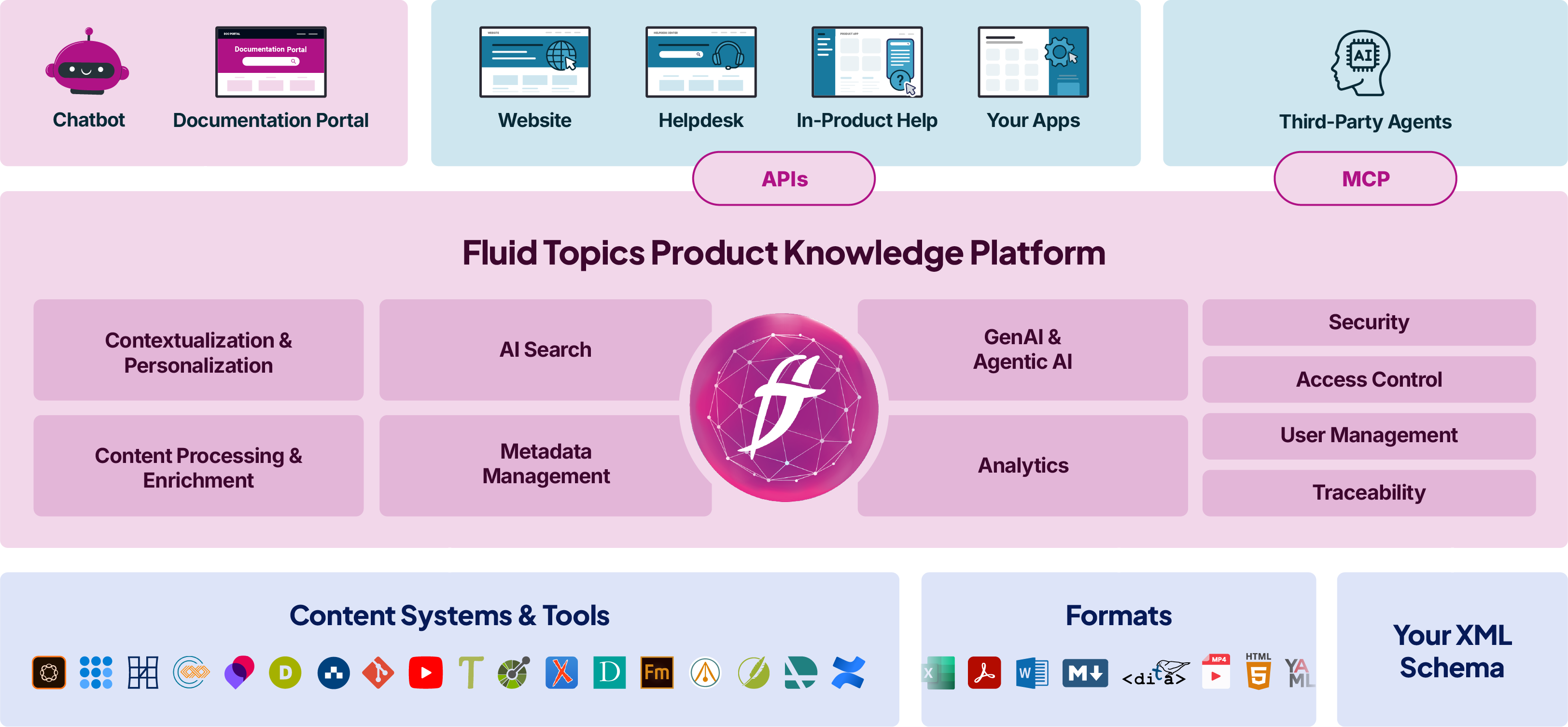
Key features:
- Intelligent Search Engine: This AI-enabled search engine employs keyword and semantic search to provide an excellent user experience when looking for documentation or information. Fluid Topics’ search engine learns from user behavior and understands the context of each query. Understanding context is especially important in retrieval augmented generation (RAG), where the ability to retrieve contextually appropriate content is essential for generating accurate and insightful responses. By enhancing the understanding of user queries, this feature helps RAG models align the retrieved data with the specific needs of the task, improving accuracy and relevance.
- Out-of-the-Box Connectors: Ready-made connectors centralize and harmonize content from various locations in one knowledge hub. This allows users to access all software documentation from any endpoint connected to Fluid Topics. For example, the Markdown connector allows teams to quickly and easily publish and package content from Visual Studio Code for users.
- Fluid Topics AI: Fluid Topics AI redefines how customers, technicians, and support agents engage with your product knowledge. From direct question answering to advanced RAG chatbots and process automation, you can deploy generative and agentic AI at scale without costly infrastructure changes. In just a few clicks, you can access ready-to-use AI tools that drive productivity, built on a secure platform and grounded in your trusted, AI-optimized content.
Conclusion: Choosing the Right Software Documentation Tools
With a selection of these 20 software documentation tools, your team will offer consistent, satisfactory user experiences. You’ll need to conduct further research to narrow down which solutions are the best fit for your teams. With the right tool stack, your documentation will improve product adoption, empower user autonomy, and increase user satisfaction.
Schedule a free demo of Fluid Topics with a product expert
Software Documentation FAQs
Software documentation aims to provide high-quality support to end users when and where they need it. It’s typically a user’s first point of contact when seeking to resolve a problem, and therefore needs to be clear, simple, detailed, and well-organized whether the user be a developer, engineer, or consumer. By providing the right information for each user’s context, documentation aims to avoid product downtime and support escalations like opening help desk tickets.
 Agentic AI vs Generative AI: A Guide for Technical Writers
