
 Top Software Tools for Product Engineers in 2026
Engineering
How Engineering Teams Generate Documentation Automatically from Markdown
Engineering teams move fast, but documentation often falls behind. Discover how developers automate documentation directly from Markdown, the advantages this brings to modern workflows, and how Product Knowledge Platforms like Fluid Topics turn raw Markdown into structured, user-friendly documentation delivered at the pace of every release.

Table of Contents
- The Documentation Gap in Product Engineering
- Two Approaches to Accelerating Software Documentation
- Why Markdown is the Bridge Between Engineering and Documentation
- Key Benefits of Markdown for Product Engineering Teams
- Docs-as-Code: The Framework That Connects Both Teams
- How to Publish User-Friendly Documentation from Markdown
- Best Practices to Generate Software Documentation with Markdown
- Fluid Topics’ Approach to Real-Time Markdown Publishing
- Thinking Ahead: Why Markdown Is the Perfect Format for AI
Editor’s note: This article was originally published in July 2021. It has been completely revised and updated to ensure accuracy and completeness.
You shipped three releases last week. Your documentation? Still reflecting features from two sprints ago.
If this sounds familiar, you’re not alone. Engineers face accelerating release cycles, sometimes shipping features and committing changes multiple times a week or day. Yet, documentation remains stubbornly manual in a parallel universe with its own tools, processes, and timelines, where it is always playing catch-up. The result is predictable: developers answer questions that should be documented, support tickets pile up, and users struggle with features that technically work, but lack clear guidance.
What if documentation could move at the same velocity as code without requiring engineers to give expert interviews or write content? What if it lived in repositories, versioned alongside features, and published automatically with the continuous integration and continuous deployment (CI/CD) pipelines teams already use?
This is what generating documentation from Markdown makes possible. We’ll explain how engineering teams are automating documentation to match their release velocity, why Markdown is the key to making it work, and what it looks like in practice when documentation becomes part of the product infrastructure rather than an afterthought.
The Documentation Gap in Product Engineering
Engineering teams move fast. CI/CD workflows enable multiple releases per day, and cycles are moving at an increasing velocity as pressure ramps up for Web Apps and SaaS solutions to roll out new features. Engineers push updates and fixes to production the moment they pass testing. But documentation rarely keeps pace.
Traditionally, technical writers interview developers, draft content in specialized authoring tools, and coordinate manual publishing cycles that can take days or weeks. By the time documentation goes live, the product has often moved on to new updates.
This creates real problems. Developers spend time answering questions that should be documented. Support tickets multiply. Users struggle to implement new features. Internal teams lack visibility into product capabilities. The longer documentation lags behind releases, the more technical debt accumulates.
The core issue lies in the systems and workflows between teams. Engineers commit code multiple times daily using Git-based workflows. Meanwhile, documentation lives in separate systems with separate processes, disconnected from the development lifecycle.
Two Approaches to Accelerating Software Documentation
There are two methods to accelerate documentation production, so publication aligns with release cycles.
Option 1: Scale Up. Hire more writers to produce content faster. This approach is resource-intensive and may not keep pace with increasingly rapid releases.

Option 2: Scale Out. The engineers get involved in content creation. Instead of relying solely on writers to document features after the fact, engineers contribute to the technical knowledge they already generate such as code comments, README files, API notes, while writers review and refine the material.

The benefits of scaling out are huge. Teams produce faster without increasing resources, increase content diversity, and leverage their existing expertise to maximize business outcomes. After all, no one knows the product and its updates better than the engineers building it.
Skeptics of the scale-out approach assume developers would be forced to spend valuable time producing documentation using rigid formats like DITA or specialized tools. The truth is that developers already write a lot of content, so the real scale-out solution lies in Markdown.
Why Markdown is the Bridge Between Engineering and Documentation
Markdown has become the de facto standard for technical documentation in software engineering. It’s lightweight, easy to learn, and version-controlled, making it a natural fit for CI/CD workflows. Beyond the ease of the syntax itself, there is no barrier to entry with Markdown. It is not another tool, nor another system to install and maintain. Plus, teams don’t need to get IT authorizations or secure a budget. Engineers already use Markdown for README files, API specifications, and code comments in tools like GitHub, GitLab, and more. The format requires no specialized tools—any text editor works—, and changes track cleanly in Git alongside code.
Key Benefits of Markdown for Product Engineering Teams
For product engineering teams, generating documentation from Markdown offers critical advantages:
- Native integration with development workflows. Markdown files live alongside your code in Git repositories. The files are written as engineers build features, commit together, and version with the same tools. This ensures documentation always reflects the current state of the software.
- Automated publishing through CI/CD pipelines. Markdown’s plain-text format makes it perfect for CI/CD pipelines. Documentation can be automatically built, tested, and published whenever code changes, reducing manual steps and keeping user-facing content up to date.
- Collaborative content creation. Engineers, product managers, and experts contribute directly to content production. Meanwhile, technical writers focus on standards, governance, and high-value content.
- Scalability for rapid release cycles. Markdown-based workflows scale effortlessly. Each commit can trigger documentation updates, making Markdown ideal for agile teams and SaaS products with frequent releases.
- Flexible output options. Markdown content can be converted into HTML or PDFs, or integrated into dynamic knowledge platforms, making it easy to deliver documentation in multiple formats without reauthoring.
In short, Markdown is the best way for an organization to get its developers to collaborate on documentation.
Docs-as-Code: The Framework That Connects Both Teams
Fans of the scale-out strategy will also like docs-as-code, also called DevOps-based documentation. This approach treats documentation like software, so it goes through the same version controls, reviews, and tests as application code.
For engineering teams, docs-as-code means documentation fits naturally into existing workflows. No context switching, no separate tools, no documentation tickets that sit in a backlog.
For documentation teams, it means access to accurate, timely source material, directly from engineers, with a clear audit trail and the ability to enforce standards through review processes rather than after-the-fact corrections.
What practices and tools support a docs-as-code strategy?
- Developers create and manage documentation in existing source control systems such as Git or SVN.
- They rely on lightweight, text-based formats like Markdown, YAML, AsciiDoc, or reStructuredText to ensure simplicity and effective version tracking.
- Documentation is stored in Git repositories, enabling complete visibility and traceability of revisions.
- Before publishing, content can be previewed using static site generators such as Hugo or Jekyll.
- With every commit in the CI/CD pipeline, the corresponding documentation is automatically extracted and published, for example, to a Product Knowledge Platform (PKP).
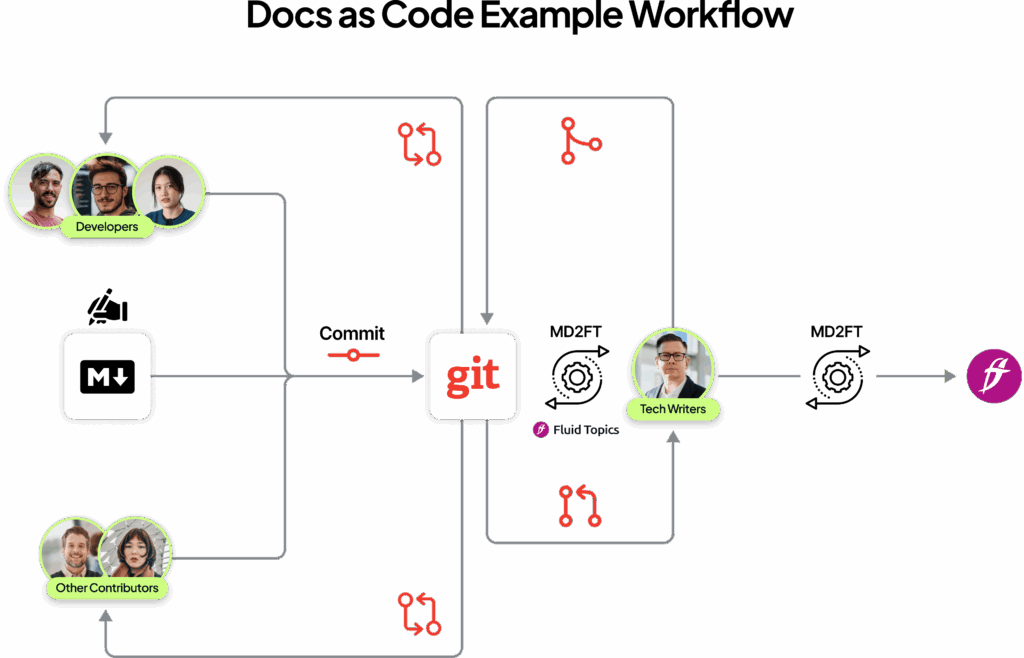
How to Publish User-Friendly Documentation from Markdown
In fast-paced content environments, traditional publishing models such as building static sites, manually uploading assets, and coordinating releases can slow your team down. Trying to publish documentation in real time without the right tools often ends up reducing productivity rather than increasing it.
Raw Markdown files need processing before they reach users. Documentation solutions like Product Knowledge Platforms automate this transformation and enable real-time publishing. PKPs consolidate and unify scattered content into a single, authoritative source. From there, they deliver consistent, reliable product knowledge to any channel—documentation portals, in-product help, support tools, or AI applications.
Best Practices to Generate Software Documentation with Markdown
There are a few steps engineers can take to optimize their Markdown documentation generation setup.
- Structure Markdown files in a repository: Engineers must organize content logically with consistent file naming conventions and clear directory structures, so automated systems reliably locate and process files.
- Include metadata in Markdown Frontmatter: This supports automated processing. Fields like title, version, category, and tags enable automatic organization and filtering of published content.
- Configure automated extraction on Git events: CI/CD pipelines should trigger documentation extraction when relevant code changes are merged. This involves configuring webhooks or pipeline jobs that run on specific branches.
- Control visibility and versioning: Teams need to preview content in staging environments, share pre-release content with beta users, or restrict internal-only APIs through visibility rules and version controls in CI/CD workflows.
Fluid Topics’ Approach to Real-Time Markdown Publishing
Fluid Topics provides a streamlined process for converting Markdown content into interactive, user-friendly documentation. Here’s how it works:
- Markdown Ingestion: Fluid Topics uses a dedicated Markdown connector to ingest Markdown files. This connector is configured to process and publish Markdown content directly into the Fluid Topics platform.
- Enriching content: You can add metadata, version tags, and taxonomies that enable intelligent search and filtering.
- Content Structuring: Each heading in a Markdown file automatically creates an entry in the table of contents within Fluid Topics, making navigation intuitive for users.
The final user-facing documentation looks clean, navigable, and context-aware, preserving the structure and formatting of Markdown while incorporating features such as live search, cross-references, and dynamic filtering.
Essentially, Fluid Topics turns static Markdown into a structured, interactive knowledge experience that’s easy for users to explore and search.
Thinking Ahead: Why Markdown Is the Perfect Format for AI
Markdown has become much more than a simple way to write documentation; it’s now at the center of modern developer workflows and continuous content delivery. By letting engineers write alongside code, track changes in Git, and integrate with CI/CD pipelines, Markdown ensures documentation stays up to date, reduces technical debt, and scales effortlessly with rapid release cycles.
At the same time, Markdown’s clean, structured format makes it ideal for AI systems and intelligent agents. Its simplicity allows automated tools to parse, understand, and even generate content efficiently, turning documentation into a resource that serves both humans and machines. This dual role positions Markdown as a universal language for documentation in the age of AI, bridging the gap between developers, writers, and intelligent systems.
For teams building SaaS products or fast-moving software, adopting Markdown isn’t just a workflow improvement. It is a strategic step toward future-ready documentation that works seamlessly for people and AI alike.
Schedule a free demo of Fluid Topics with a product expert
Top Software Tools for Product Engineers in 2026

 How to Simplify Documentation Publishing for Software Product Releases