Content Ops
What is a Component Content Management System (CCMS)?
Component Content Management Systems (CCMSs) manage content at the component level rather than at the document level. Discover the features, benefits, and limitations of a CCMS. Then learn why they are complementary tools with Product Knowledge Platforms.

Table of Contents
- What is a Component Content Management System?
- CCMS vs. CMS: What are the Differences?
- Platform Goal and Outputs
- Content Structure
- Content Reusability
- What are the Key Features of a CCMS?
- Collaborative Authoring
- Structured Authoring
- Advanced Metadata and Taxonomy
- Reuse and Repurposing
- Multiformat Publishing
- What are the Benefits of Using a CCMS?
- Improve Content Consistency
- Enhance Collaboration
- Make Costs and Time More Efficient
- Reduce Translation Costs
- CCMS Pre-requisite: Content Strategy Work
- What are the Limitations of a CCMS?
- Restricted Single Source
- Limited Publishing Capabilities
- No Dynamic Delivery
- CCMS and Product Knowledge Platform: Complementary Tools?
- What is a Product Knowledge Platform?
- Which PKP is Best for You?
- Future Trends for CCMSs and PKPs
- Writers Will Use AI for Content Production and Automation
- Authors Will Write (& Publish) for AI Understanding
- New Integrations with Other Technologies Will Appear
- Conclusion
Editor’s Note: This post was originally published in July 2024. It has been completely edited and updated for accuracy and comprehensiveness.
Key Takeaways
- A Component Content Management System is a platform for managing content at a granular component level (not the document level). It is used to create technical documentation at scale.
- Unlike traditional CMS platforms, CCMSs support structured authoring, advanced metadata, and content reuse. This allows teams to efficiently create consistent documentation across products, versions, languages, and formats.
- Key benefits of a CCMS include faster content production, easier collaboration, lower translation costs, and improved content consistency through single-source reuse.
- CCMS adoption requires upfront content strategy work (i.e., define content models, metadata, taxonomies, and authoring standards) before teams benefit from structured content workflows.
- CCMSs have limitations around multichannel publishing, dynamic delivery, and integrating content from external sources. Pairing a CCMS with a solution like Fluid topics eliminates these issues.
Managing documentation quality and accuracy is a complex and daunting task for businesses with many different contributors publishing content. From accelerating product launches to new regulatory controls, producing reliable and readily available product documentation is increasingly difficult. Yet, progressively, companies need to produce larger quantities of documentation in shorter periods of time.
A Component Content Management System (CCMS) is a foundational tool for technical writers producing technical documentation at scale across products, versions, languages, and regulated formats. In this article, we cover how a CCMS works, its core features and benefits, its limitations, and how it complements a Product Knowledge Platform (PKP).
What is a Component Content Management System?
A Component Content Management System is a specialized content management platform that stores, manages, and reuses content at a granular component level, rather than at the full document level. Components may include individual words, paragraphs, images, and videos. CCMSs are widely used in technical documentation, regulated industries, and product content at scale.
Think of the CCMS components as bricks or Lego pieces that create a complete piece of content when assembled. Components are organized according to a schema, or content model, to create these final pieces of content.
Let’s compare and contrast some of the most popular CCMSs on the market.
CCMS
Authoring format
Best for
Paligo
XML-based structured authoring
Fast onboarding, small–mid teams needing structured authoring without XML complexity
AEM Guides
DITA and DITA XML
Enterprises already invested in the Adobe stack
Heretto
DITA XML; cloud-native structured authoring environment
Companies that want to publish CCMS content to a customer-facing knowledge base
Madcap IxiaCCMS
DITA XML; powered by oXygen XML Editor with a Word-style author mode for accessibility
Large enterprises with strict documentation governance
Author-it
Proprietary object-based authoring model; supports multi-format publishing (HTML, PDF, Word, and more)
Smaller teams or those looking for reuse and multi-format output without DITA overhead
Componize
DITA XML
Enterprises in manufacturing and industrial documentation ecosystems
RWS (Tridion)
DITA XML and Fonto (web-based XML)
Global enterprises with complex multilingual documentation
Intuillon (DITAToo)
DITA XML and native editor for web-based structured authoring
Smaller teams looking for a lightweight DITA adoption (not a full enterprise CCMS)
Bluestream (XDocs DITA)
DITA XML
DITA-intensive technical publishing teams in regulated and compliance-heavy industries
CCMSs typically publish documents in PDF, Word, and HTML formats. Some integrate with helpdesk tools and other applications by transferring files formatted for each endpoint. However, only the leading solutions offer APIs or native integrations into third-party systems.
CCMS vs. CMS: What are the Differences?
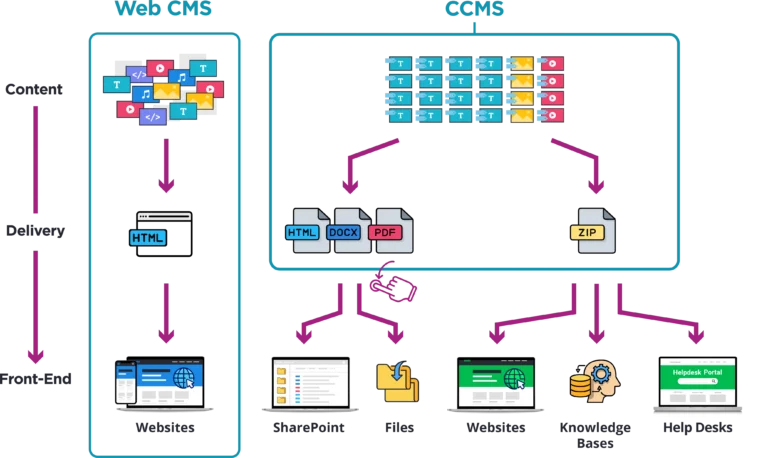
CCMSs have unique features that set them apart from traditional Web Content Management Systems (CMSs). CCMSs are built to create large amounts of content by reusing components. This helps produce many variations of technical documentation, including different product versions, languages, and other variations. These platforms are similarly useful for publishing content for highly regulated industries. It’s important to understand the different types of content management tools when choosing a solution for your writing teams.
Platform Goal and Outputs
- Traditional: Web CMSs allow content teams to write content, manage it, and customize the front end where the content is embedded. The goal is to create a website that gives the public access to information.
- CCMS: CCMSs are used to create content. They don’t usually offer a front-end for accessing and reading content. The outputs of a CCMS are documents that teams can then distribute either manually or through semi-automated scripts and APIs to various front ends.
Content Structure
- Traditional: Web CMSs manage content at the document or page level. They support the creation, editing, management, and publishing of unstructured documentation for more commercial and corporate sites. The way authors produce documentation is linear and logical, resulting in a webpage as a final output.
- CCMS: They manage content at the component level. Its standardized content structure allows authors to take advantage of automated processes to assemble and reuse components for different documents, which is ideal for writing technical documentation.
Content Reusability
- Traditional: Content cannot be reused across publications with a CMS. When writers want to reuse parts of content, they must manually copy and paste the selected sections into new documents.
- CCMS: Since CCMSs work at the component level, teams can easily reuse modular content and topics. No copy and paste needed — the content model automatically forms documents using existing components.
What are the Key Features of a CCMS?
CCMSs are beneficial for companies that need to produce hundreds of documents with overlapping sections of content that repeat in each document. To serve this purpose, CCMSs have several features that make them essential tools for producing technical documentation.
Collaborative Authoring
A CCMS provides a centralized and collaborative space where content teams can create and store structured content. They also incorporate workflow management functionalities that facilitate content creation coordination. This allows authors to allocate tasks, establish deadlines, monitor the advancement of content, and validate changes, clarifying responsibilities and timelines for all team members.
Structured Authoring
Structured content authoring is at the heart of CCMS platforms thanks to their component architecture. Authors create independent chunks of content using markup language and XML format. Some of the most popular languages are DITA, DocBook, and S1000D. In addition to the components, CCMSs include content schemas or content models. These models identify the components needed to create full pieces of content. Once authors are ready to assemble the final documents, the content model sources different components based on the schema structure and component metadata. This automates content production.
Advanced Metadata and Taxonomy
CCMSs allow teams to track metadata during component production, such as product type, translation status, version number, audience, and more, down to the component level. First and foremost, metadata indicates which components need to be used and applied to each content model to produce a given version of a document.
Additionally, metadata helps track the relationships between components and provides insights into the availability and value of existing content. Relatedly, CCMSs use taxonomies to categorize and label content. By defining these hierarchical relationships between components, content is easier for writers to find, making collaboration fluid.
Finally, metadata enhances CCMS search capabilities by providing additional data points for search engines. Users can search not just by content, but also by attributes such as author, date of creation, topic, and other metadata fields.
Reuse and Repurposing
Content written in CCMSs is modular, making it easy to reuse. CCMSs contain a single library for content components, and once a writer produces a component, it is ready for endless reuse. Then, when authors apply a content schema, the structure sources newly created components to produce updated content. This automated publication enables authors to quickly scale up the volume of content created. With a CCMS, teams create hundreds of documents, reusing the same components, at the push of a button.
Multiformat Publishing
The component structure within a CCMS is ideal for publishing documents much faster. Depending on where teams want to put these final documents, they can publish content in various formats (HTML, PowerPoint, Word, PDF, etc.) by applying predefined templates. They can easily publish each document in multiple formats at once to meet their varying content needs.
What are the Benefits of Using a CCMS?
With such diverse and intuitive features, it’s no wonder that using a CCMS offers several benefits to content operations.
Improve Content Consistency
Technical writers often write about the same subject in different documents. 30% of tech writers say keeping documents in sync is their biggest workflow challenge. When they rewrite the same content many times, they risk differences between documents on similar topics. This gets even more complicated when product changes arise. A CCMS helps because it lets writers reuse components across different documents. This means two documents can use the same component without rewriting it. With component reuse, companies keep documents consistent.
Enhance Collaboration
A CCMS provides the environment necessary for teams to work together efficiently. For example, colleagues can work simultaneously on different components within the same document. With a central location for all content writing, users can advance on priorities without slowing down the content delivery timeline. No more emails with static document versions containing different changes.
Make Costs and Time More Efficient
Rather than building a new, bespoke document, CCMSs allow teams to mix and match both new and existing content. Component reuse saves time and reduces costs. Teams only need to write each topic once, allowing them to use their time more productively and produce new content. Not only do teams reuse content, but with a CCMS, it’s easy to render content into multiple formats at the point of publishing documents, automating content creation with the touch of a button. The result is significantly less content production time.
Reduce Translation Costs
As companies grow and expand, translated documentation becomes increasingly important. With CCMSs, companies don’t need to translate full documents, but individual components, making the process as productive as possible. This minimizes costs and reduces the vast majority of the effort needed for translation. Additionally, when new components are added, only the new components need translation. That way, teams don’t waste time and money retranslating documents with parts that have already been translated. As a result, translation becomes more efficient and scalable with a CCMS.

The adoption of modern CCMS solutions is growing as organizations prioritize efficiency, agility, scalability, and ease of use in their content workflows.
Rasmus Petersson
VP of Product at Paligo (said during an interview with Tom Johnson)
CCMS Pre-requisite: Content Strategy Work
Before getting started with a CCMS, there’s one key requirement that all teams must complete. To best use a CCMS to write structured content, companies need to think about their content strategies. What goes into a content strategy?
- Content architecture
- The level of content granularity
- Content reuse needs
- Taxonomies
- Metadata strategy
Organizations must determine these elements before authors can begin writing. This is a time-consuming yet essential process to complete after adopting a CCMS. Then, once this preparatory work is complete, businesses still need to train authors on how to create topics and write in the CCMS. While this process may take time, it’s an essential step in enhancing the development and quality of a company’s content creation.
What are the Limitations of a CCMS?
Despite the inherent value and benefits of CCMSs, they also have some drawbacks that may create documentation challenges.
Restricted Single Source
CCMSs only include content written within their platforms. If content is created elsewhere and tech writers want to use it in their content, they must rewrite it. Teams cannot seamlessly combine content from multiple sources, like MS Word product sheets, with the content in their CCMS.
Limited Publishing Capabilities
Once a CCMS assembles content using components and a content schema, the author can publish documents in multiple formats, the most popular ones being MS Word, PDF, and HTML. However, someone still needs to take those documents and upload them to the necessary endpoints, such as a resource center or website. Typically, this is a manual or semi-automated process where teams must set up various scripts to deliver the right content to each corresponding touchpoint.
Additionally, endpoints like customer relationship management (CRM) systems and learning management systems (LMS) may require content to be updated in different formats beyond those in which a CCMS can publish content. Therefore, CCMSs may need dedicated APIs to send generated content to the right platforms and tools.
In summary, ensuring that a CCMS can deliver content to each touchpoint requires significant configuration, customization, and maintenance.
No Dynamic Delivery
CCMSs only allow for static publishing. This means they create files and documents that are frozen in their formats and states at the moment of publishing. When an author makes changes or creates a new component to integrate into documents — be it one or one hundred documents— they all need to be reassembled, republished in the right formats, and re-exported to their final endpoints.

CCMS and Product Knowledge Platform: Complementary Tools?
A CCMS is a great tool for writing and reusing structured content. However, most likely you also have other sources of content: Word documents, wikis, knowledge bases, etc. This information also needs to be part of your product documentation and shared with the right audience. Currently, there are two main options to do this. The first is to rewrite this content in a CCMS to add it to the main publishing process. The second option is to manually handle each separate publishing process to get the content from various sources to numerous endpoints. While using a CCMS solves content creation problems, it doesn’t resolve content publishing difficulties.

So, how do you solve delivery challenges while still enjoying the benefits of a CCMS? We recommend combining your CCMS with a Product Knowledge Platform.
What is a Product Knowledge Platform?
A Product Knowledge Platform is a software solution that gathers your product knowledge from any source (CMS, CCMS, Github, Sharepoint, helpdesk tools, Wikis) and in any format. It unifies and delivers this information to any endpoints via seamless native integrations and APIs. PKPs are agnostic when connecting to authoring tools, able to handle both structured and unstructured content.
Additionally, PKPs dynamically collect content from different sources to automatically reflect the latest changes. This keeps the documentation live and accurate on the user side at all times.
Which PKP is Best for You?
Fluid Topics, the leading Product Knowledge Platform for technical documentation, provides an extensive range of connectors for CCMSs as well as other authoring tools (MadCap Flare, Adobe FrameMaker, etc.). Furthermore, it offers ready-made connectors for common formats and languages (Markdown, HTML, YAML, etc.). By creating a unified content repository, Fluid Topics removes the complexity of publishing across information silos. Let Fluid Topic’s documentation platform function as your single source of truth, where users can consistently find up-to-date and personalized content. In parallel, with out-of-the-box APIs and integrations, our PKP delivers a consistent content experience across your different channels.

Together, a CCMS and a PKP cover the full content production and delivery process, ensuring a smooth, engaging user experience at each step. But don’t just take our word for it! Jacob Sisk, Product Manager at Paligo, one of the leading CCMSs, described the benefits of this winning combination when he said, “By integrating Paligo with Fluid Topics, we’re able to give our customers a seamless end-to-end experience, from the structured authoring environment all the way to personalized content being delivered to the end-user.”
Future Trends for CCMSs and PKPs
Looking ahead, the future of CCMSs and PKPs is both bright and undeniably intertwined for technical documentation teams.
Writers Will Use AI for Content Production and Automation
AI has made huge advancements in the past few years, with new applications continuing to emerge. In the context of content production, native AI capabilities in CCMS platforms and other documentation tools help with documentation consistency, marking up optimization opportunities, summarizing, brainstorming, preparing outlines, and translation. These generative AI workflow applications improve the productivity of technical writers.
The arrival of agentic AI means new opportunities to automate entire publication pipelines and streamline operations. Documentation teams will increasingly use these systems to automate documentation workflows, create user feedback loops, and coordinate release notes.
Agentic AI vs Generative AI: A Guide for Technical Writers
On the content delivery side, AI is about enhancing the user experience. By leveraging Natural Language Processing and Machine Learning, businesses can design relevant, personalized content experiences for users. This approach not only improves the search experience but also increases engagement.
We will continue to see companies combine their CCMS, Product Knowledge Platform, and AI applications for a cohesive, accurate, and improved user experience.
Authors Will Write (& Publish) for AI Understanding
Even if your content meets technical accessibility standards, its writing style and structure can still cause challenges for AI systems. Today’s human-centered content often contains multiple elements that make it harder for AI tools and platforms to interpret and understand clearly. Issues such as fragmented context, semantic discoverability gaps, implicit knowledge assumptions, visual information dependencies, and format-dependent information create AI misunderstanding.
Technical writers will need to adjust their content strategy to write for AI understanding. Their CCMS will help break content into granular text, integrate metadata and taxonomy, apply cross-linking, and implement other best practices that make content easier for AI to understand. In fact, 70% of documentation teams are now factoring AI in their information architecture decisions.
A PKP like Fluid Topics then ensures that the published content is accessible to agentic AI systems for cross-enterprise AI workflows.
New Integrations with Other Technologies Will Appear
New channels and technologies will continue to emerge. As they do, it is crucial for companies to find ways to integrate their content with them in a user-friendly, responsive, and consistent way. Some channels, like AI-powered chatbots, became quick favorites among users, while devices using Augmented Reality and Virtual Reality are popular yet less widespread. Moving forward, these technologies will present unique challenges to organizations that must ensure that users can still search for and consume company content easily from any channel and device.
Conclusion
From automated content generation to enhanced collaboration, CCMSs provide many benefits to the content production process. However, given the lack of multichannel or dynamic delivery, we believe that combining a CCMS and Fluid Topics is best for maximizing technical content’s potential. Learn more about Fluid Topics’ AI-powered Product Knowledge Platform and how combining it with a CCMS will optimize the documentation reading experience.
Schedule a free demo of Fluid Topics with a product expert
FAQs
DITA stands for Darwin Information Typing Architecture, and it is an open-standard XML-based framework and writing methodology. This specification is used to author small, reusable topics in technical documentation.
 6 Technical Documentation Trends to Watch in 2026