
 How to Make Your Documentation AI-Ready: A Practical Step-by-Step Guide
Content Ops
How to Write and Publish Documentation That Boosts GEO
The next step in implmementing a Generative Engine Optimization strategy is to look at how to alter your content operations. Read on to learn about the editorial, structural, and technical practices that technical writers can implement to increase GEO outcomes.

Table of Contents
- What Editorial Practices Make Documentation AI-Ready?
- Write Headings Phrased as Questions
- Use Product and Feature Names
- Add Detail, Context, and Examples
- Include Alternative Text for Images and Diagrams
- Write FAQs
- How to Structure Documentation for AI
- Create Granular Topics
- Establish Logical Heading Hierarchies
- What Other Structural Signals Help AI?
- How Do I Publish Content for AI Understanding?
- Choose File Formats That Work Best for AI
- Include a robots.txt File
- Consider an llms.txt File
- Maintain Your Sitemap
- Conclusion
Welcome to “GEO for Documentation Teams,” an article series where we break down how modern documentation portals are upgrading user content experiences with advanced AI capabilities. Don’t miss our other articles on why docs teams need a GEO strategy, an intro to answer engines, the differences between SEO and GEO, the benefits and challenges of GEO, and how to measure results.
Key insights
- Writing practices like using questions as headings, saying feature names, including examples, adding alt text to images, and writing FAQs help documentation be more AI friendly.
- Regarding structure, writers should produce granular, self-contained content, use logical heading structure, and include rich semantics, metadata, schema markup, and more to improve AI understanding.
- Publishing content for AI understanding includes using AI-friendly formats, including a robots.txt file, adding an llms.txt file, and building a sitemap.
If you’ve made it this far in our Generative Engine Optimization (GEO) series, you already know why a GEO strategy matters and the value it delivers. Now you’re likely asking what specific changes your content team needs to make to put GEO best practices into action.
Writing for AI extraction isn’t a complete overhaul of technical writing best practices. Instead, it’s an extension of them, with a few specific adjustments that make the difference between content AI can cite confidently and content it skips over.
What Editorial Practices Make Documentation AI-Ready?
There are several writing practices that make technical documentation easier for AI tools to find and understand. With recommendations changing often, we’ve gathered the top actions that are essential for GEO strategies.
Write Headings Phrased as Questions
Headings should be phrased as questions as long as they read naturally and don’t create friction in the reading flow. When writers structure headings as questions, this helps AI systems match user queries to the right topic or section of content. It is also useful for human readers looking to quickly find the section they need.
Less AI-Friendly
More AI-Friendly
Authentication
How do I set up authentication?
API rate limits
What are the API rate limits?
Error handling
How do I hadle API errors?
Data export
How do I export my data?
Following the heading question, writers must provide a direct answer within the first sentences of the topic. They shouldn’t bury the key information behind long introductions or caveats. AI systems are searching for clear, direct answers, so the faster they find one, the more likely they are to use it. Writers can then add supporting context afterwards for readers working through the full text.
Use Product and Feature Names
AI only knows what it’s given. Documentation that uses consistent, specific names for product lines, components, and parts fills in knowledge gaps that generic phrasing leaves open.
Less AI-Friendly
More AI-Friendly
The Dashboard
The Analytics Portal Dashboard
Install the switch
Install the NX-48 Aggregation Switch.
Verify the transfer completed successfully.
Verify the Data Synchronization Process completed successfully.
Attach the cover using four screws.
Secure the outer shell firmly.
Attach the Front Access Panel to the chassis using four M4 screws.
Secure the Front Access Panel firmly before power-on testing.
Vague references like “the dashboard” or “the switch” force AI to guess at meaning, leading to confusing AI-generated instructions. Using specific names in instructions eliminates that ambiguity entirely.
Add Detail, Context, and Examples
Most documentation includes fewer details than it should for in-depth AI understanding. Content packed with specific details, examples, and use cases consistently earns more citations than broad, generic writing.
Less AI-Friendly
More AI-Friendly
Configure authentication before deployment.
Before deployment, create a service account, generate an API token in the Admin Console, and store the token as the GEO_API_KEY environment variable.
Connect your application to the database.
Set the DATABASE_URL environment variable using the format postgresql://USERNAME:PASSWORD@HOST:5432/DATABASE_NAME before starting the API server.
Upload supported files only.
The /upload endpoint accepts PDF, DOCX, and TXT files up to 25 MB. ZIP archives and image files are rejected with HTTP 415 Unsupported Media Type.
Adding precise parameters, file types, and limits may feel like more detail than is necessary. However, it is exactly the specificity AI tools rely on to verify and cite information confidently. Plus, this information will provide clear insights for human readers as well.
Include Alternative Text for Images and Diagrams
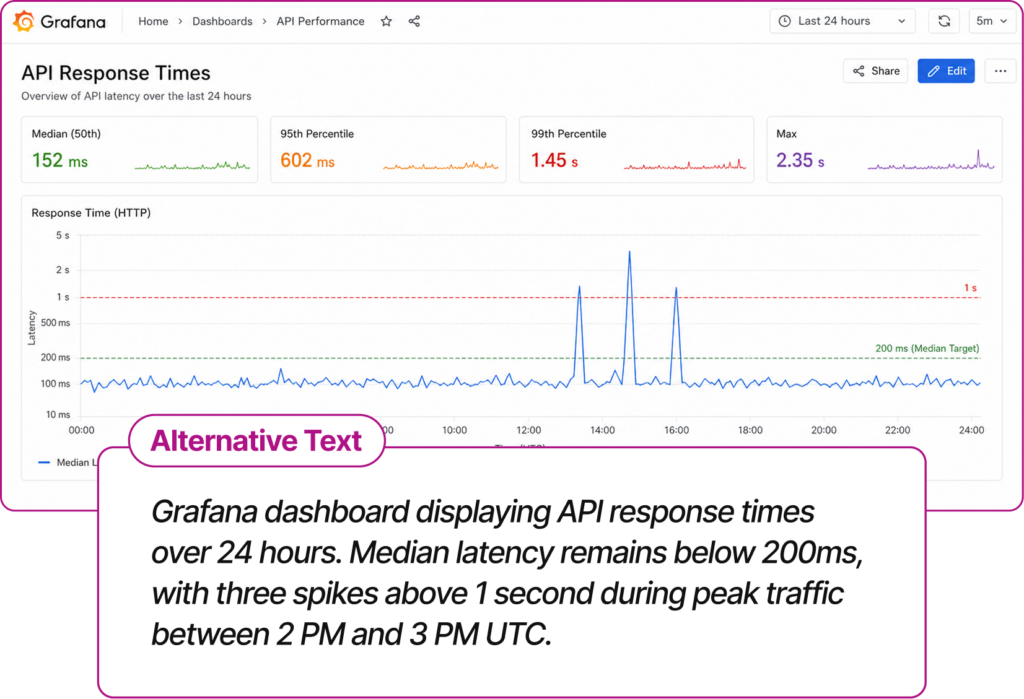
AI struggles more with visuals than with plain text, since visual-heavy formats often lose their structure when converted into plain text for ingestion. Descriptive alternative text solves this for both AI and human accessibility. Detailed alt text makes each visual’s key takeaway available to systems that can’t actually “see” the image.
Write FAQs
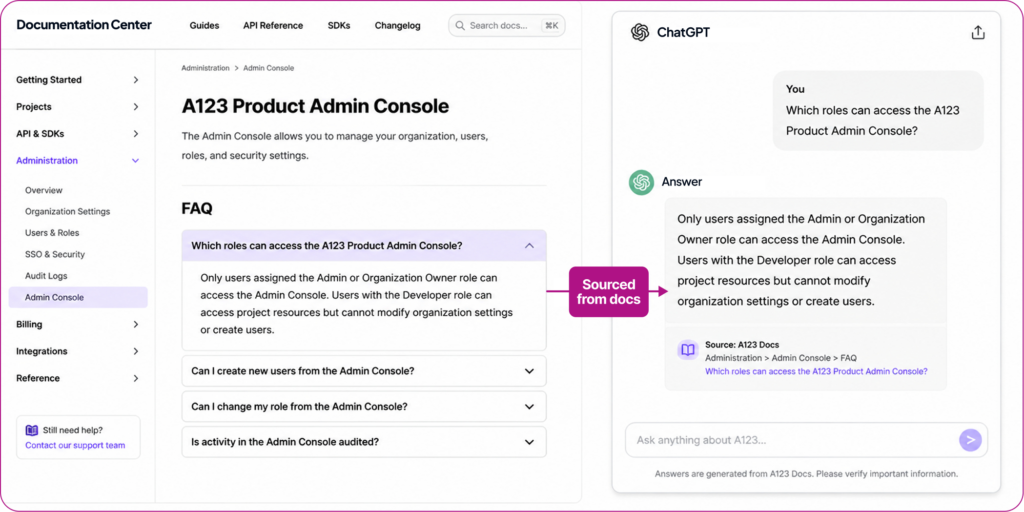
A well-built FAQ section mirrors exactly how users prompt AI: a direct question, followed by a direct answer. That structure makes it easy for answer engines to match a documented question to a live user query and cite the source with confidence. Teams should prepare FAQs based on the real questions their users ask, rather than treating the section as a catch-all. That way, they serve both human readers who scan content for the answers they need, and the AI tools that answer nearly identical user queries.
How to Structure Documentation for AI
Good sentences aren’t enough if the surrounding structure prevents AI from extracting them cleanly. How content is organized and formatted determines whether AI tools can understand it at all, regardless of how well it’s written.
Create Granular Topics
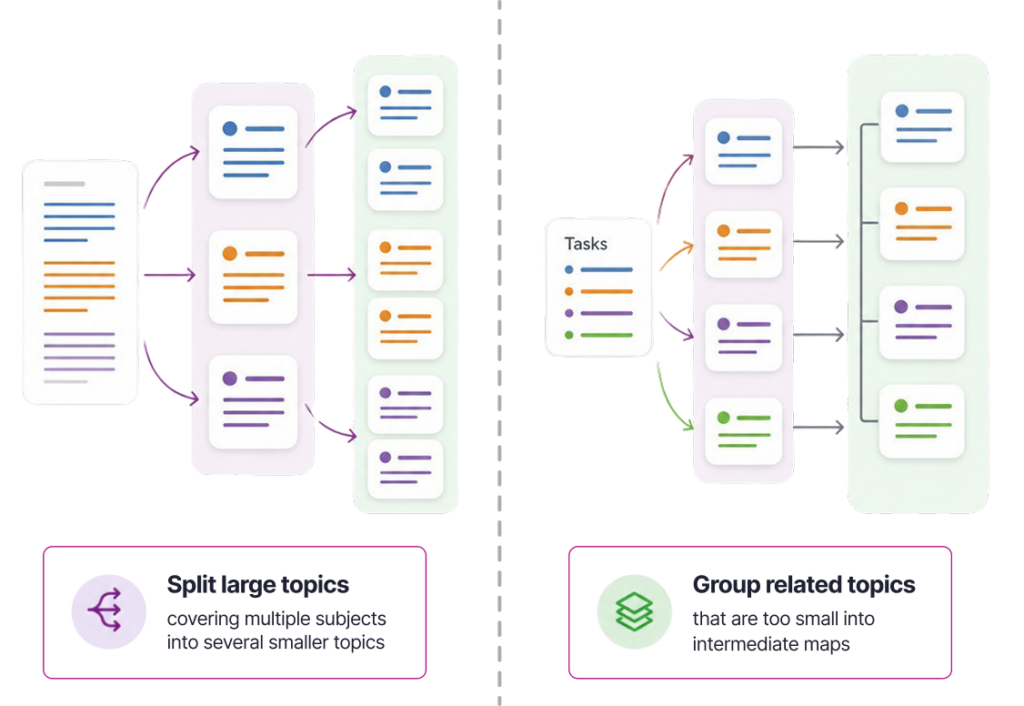
AI models rely on well-structured, self-contained information to produce accurate outputs. Writers should break content into digestible topics instead of lengthy, linear documents, a principle technical writing has held as best practice for years, but one that’s now essential rather than optional. Each topic should be able to stand alone, retain its meaning, and give AI an unambiguous fragment to work with. In practice, this means splitting large topics that cover multiple subjects into smaller ones, and grouping related small topics under intermediate maps so they don’t fragment into isolated, low-context pieces.
Establish Logical Heading Hierarchies
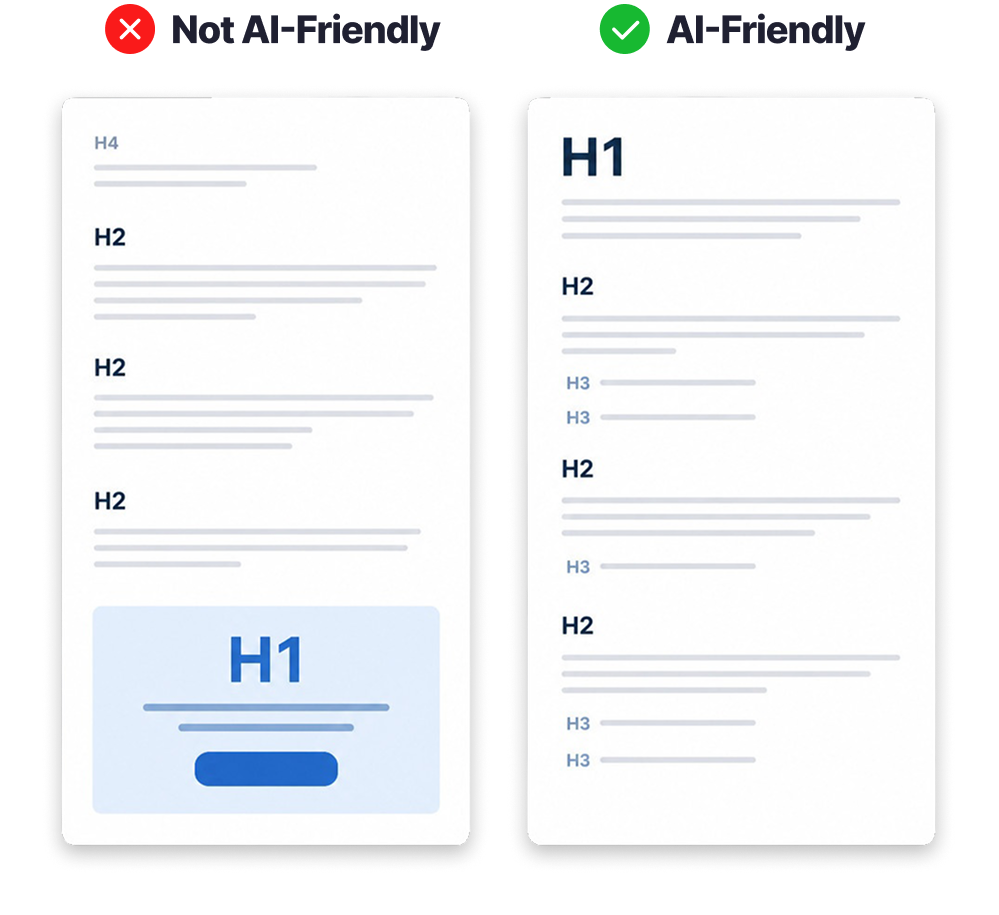
Logical, sequential heading hierarchies (e.g., H1, H2, H3) let AI follow your reasoning and understand the relationships between sections, much like a human reader scanning a table of contents. Skipping levels (e.g., H1, H2, H4) breaks that logical thread and forces AI to guess how sections relate.
What Other Structural Signals Help AI?
There are several other practices that consistently improve AI comprehension:
- Rich semantics: Labeling content elements like warnings, definitions, and steps gives AI explicit context about each section’s purpose.
- Descriptive metadata: Tags indicating purpose, audience, and relevance help AI understand a topic without reading the entire document, as long as the tags apply unambiguously to all content within that topic.
- Labeled code blocks: Indicating the programming language in every code sample helps AI deliver accurate, language-specific answers.
- Linked related topics: Cross-links between related content build a web of connections that signal topical authority, one of the factors AI models weigh when deciding which sources to trust.
- Consistent terminology: Defining domain-specific terms once and using them consistently reduces ambiguity. A term like “RAM” can mean different things in computing, engineering, or hardware contexts, and AI needs the domain made explicit.
- Schema markup: JSON-LD schema (FAQ, Article, HowTo, Review) is invisible to human readers but gives AI systems explicit, structured signals about what your content is and how to categorize it.
Get Your AI-Ready Documentation Checklist
How Do I Publish Content for AI Understanding?
There are several actions that content owners can control that impact AI understanding. Having the right formats and technical specifications in place makes it easier and actually possible for AI tools to find and parse documentation.
Choose File Formats That Work Best for AI
AI systems don’t care about beautiful designs. They simply need clear, structured content to process text easily.
Markdown and JSON are natural fits because they make content hierarchy explicitly clear. They use headings to define topic boundaries, lists to divide separate ideas, and consistent nesting to illustrate related concepts. Adding structured front matter, like YAML or JSON metadata at the top of a file, strengthens this further. It gives AI direct signals about the content topic, version, author, and related content. This adds much needed context to prevent AI confusion or assumptions.
What formats can cause challenges for AI?
Other formats create friction for AI rather than outright failure. This friction often results in missing context, broken structures, and misunderstood relationships. For example, complex PDFs and infographics often depend on visual layouts to show meaning. AI struggles to read multi-column text, footnotes, and floating objects as the order gets scrambled when flattened into plain text.
HTML: Is it AI’s friend or foe?
You’re probably wondering whether HTML is a good or a bad format for AI. The truth is, it’s complicated. HTML is fully usable when it’s semantic and doesn’t rely heavily on JavaScript. Yet, most HTML is written for browsers, not language models. Extensive CSS, JavaScript-driven content loading, and dynamic interactions that hide content all create noise that AI has to work harder to parse.
Include a robots.txt File
Using a robots.txt file is a prerequisite, not an optimization. Your robots.txt file should explicitly allow known AI crawlers (e.g., GPTBot, ChatGPT-User, OAI-SearchBot, and ClaudeBot) to tell those systems which paths they’re permitted to fetch. To be clear, this doesn’t make AI understand or trust your content better. However, if your file blocks AI user agents, tools like ChatGPT, Claude, and Gemini simply cannot scan or cite your documentation at all.
Consider an llms.txt File
An llms.txt file is a plain-text file at your domain root listing your documentation in Markdown with brief descriptions. Integrating these files is gaining popularity, but overall, technical experts remain divided. Supporters argue it helps AI agents quickly identify relevant content without crawling your entire site. At the same time, critics point out there’s no confirmed proof that LLMs actually crawl these files, and some experts emphasize that llms.txt is a high-level overview, not a discovery protocol.
Given that GEO is still an evolving discipline, we recommend treating llms.txt as a low-cost, low-risk — but potentially high reward — addition rather than a guaranteed lever.
Maintain Your Sitemap
If you already maintain a sitemap.xml for SEO, you’ve already covered this step. The same file serves both traditional search engines and AI crawlers, helping them discover your content systematically.
Conclusion
Users will turn toward AI answer engines to ask their questions whether or not your content is ready. It’s more important to get started now even if you can only implement a few steps at a time. Thankfully, many of these recommendations are already writing best practices for documentation teams, meaning many teams won’t need to start from nothing to implement this new strategy.
Finish the journey in our GEO for documentation teams series with the article “How to Measure if Your GEO Strategy Is Working”.
GEO Playbook for Documentation Teams
Learn how to get AI answer engines to find, understand, and use your documentation in their responses to user questions.
Writing and Publishing for AI FAQ
No, AI-readiness and good technical writing overlap in many areas. Clear questions, direct answers, and specific terminology improve readability for everyone. That being said, documentation teams must take a strategic approach to ensure any actions they take for GEO don’t harm the human user experience.
How to Make Your Documentation AI-Ready: A Practical Step-by-Step Guide
 Agentic AI vs Generative AI: A Guide for Technical Writers
 Top 10 Questions About Agentic AI Answered